
Cloud storage pricing for high-resolution video content is rarely as simple as advertised per-gigabyte rates suggest. Content creators and small business owners managing 4K footage, HDR clips, or extensive video libraries face a complex web of fees that includes base storage costs, data retrieval charges, bandwidth expenses, and request fees. Understanding these components and implementing strategic compression and tiering practices can transform your monthly cloud bills from budget-draining expenses into manageable, predictable costs.
Table of Contents
- Key Takeaways
- Understanding cloud storage pricing basics
- Choosing the right storage tier for video content
- Reducing costs with video compression and optimization
- Case studies and practical tips to optimize video storage costs
- Optimize your video storage with HEVCut tools
- FAQ
Key Takeaways
| Point | Details |
|---|---|
| Pricing components | Cloud storage bills include base storage costs, request charges, data retrieval fees, bandwidth charges, and minimum storage penalties, not just per gigabyte. |
| Right tier matters | Choosing the right storage tier for video can reduce costs by aligning access patterns with pricing, sometimes dramatically. |
| Compression benefits | Compressing video can dramatically reduce storage and bandwidth costs. |
| Holistic cost strategy | Combining tiering, compression, and usage monitoring helps prevent surprise bills and keeps costs predictable. |
| Egress and retrieval fees | Data transfer and request charges can add 20 to 50 percent to total expenses, especially with active workflows. |
Understanding cloud storage pricing basics
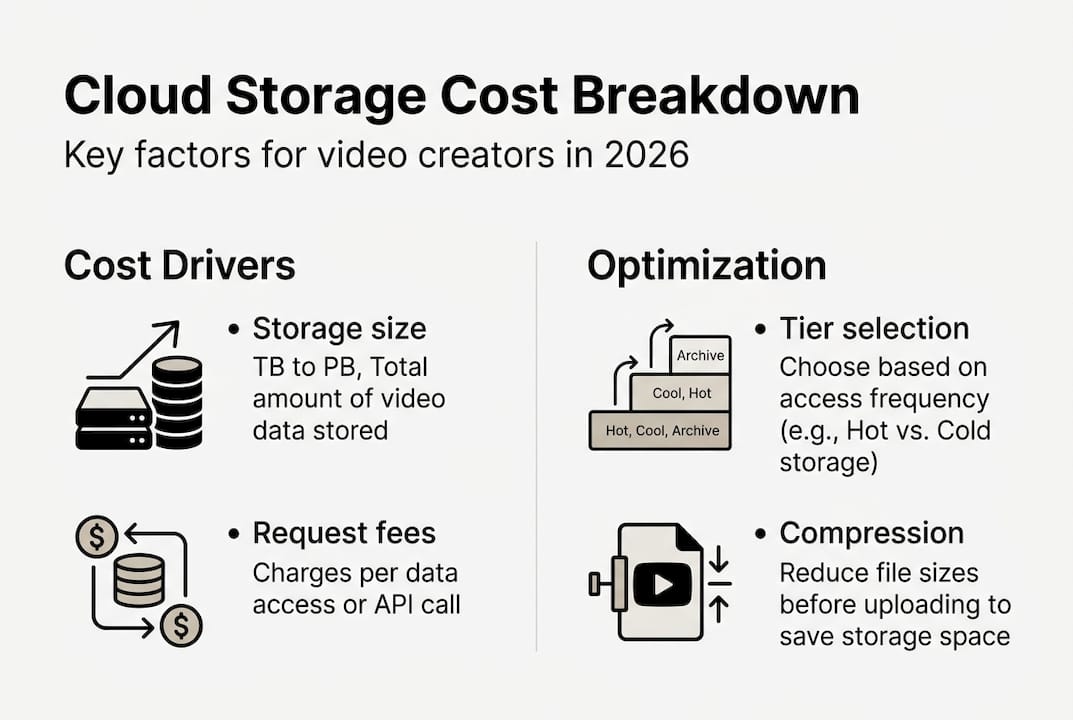
Cloud storage bills comprise far more than the advertised price per gigabyte. The total monthly expense includes base storage costs, request charges for file operations, data retrieval fees when accessing stored content, bandwidth costs for downloads or streaming, and minimum storage duration penalties for early deletion. AWS S3 Standard storage costs $0.023/GB/month for the first 50TB, while Azure Blob Hot tier runs $0.0184/GB/month and GCP Standard sits at $0.020/GB/month. These base rates tell only part of the story.
Additional charges accumulate quickly for active video workflows. S3 charges $0.0004 per 1,000 GET requests, meaning a video library accessed frequently for editing or client reviews generates substantial request fees over time. Retrieval fees apply when pulling files from infrequent access tiers, and data transfer costs hit whenever you download content or stream to viewers. Content creators managing large video libraries often discover their actual bills run 20-50% higher than simple storage calculations suggested.
Three primary cost components deserve attention when budgeting for video storage:
- Base storage fees calculated per gigabyte per month, varying by provider and tier selection
- Request and operation charges for uploading, downloading, listing, and managing files
- Data transfer costs, especially egress fees when moving content out of cloud storage
Understanding these fundamentals allows accurate forecasting and identifies optimization opportunities. Many creators focus exclusively on storage capacity pricing while overlooking request and bandwidth expenses that significantly impact monthly totals. Smart cost management requires evaluating all three components together rather than optimizing storage fees in isolation.
Choosing the right storage tier for video content
Storage providers offer multiple tiers designed for different access patterns, and selecting appropriately can reduce costs by 40-90% for suitable content. Hot or Standard tiers provide immediate access to frequently used files but command premium per-gigabyte pricing. Infrequent Access (IA) or Cool tiers reduce storage costs by 30-50% while adding retrieval fees and minimum storage duration requirements, typically 30 days. Archive and Deep Archive tiers offer the lowest per-gigabyte rates but impose higher retrieval costs and longer minimum storage periods.
Amazon S3 Deep Archive costs $0.00099/GB/month, representing 96% savings compared to Standard tier pricing. This dramatic reduction makes archival storage economical for completed projects, raw footage backups, or content libraries requiring only occasional access. However, retrieval from Deep Archive takes 12-48 hours and incurs fees, making this tier unsuitable for active production files.

| Tier Type | Monthly Cost | Retrieval Time | Best For |
|---|---|---|---|
| Hot/Standard | $0.020-$0.023/GB | Immediate | Active projects, frequent editing |
| Infrequent Access | $0.010-$0.0125/GB | Minutes | Completed projects, occasional review |
| Archive | $0.004/GB | Hours | Long-term backups, compliance |
| Deep Archive | $0.00099/GB | 12-48 hours | Permanent archives, rarely accessed |
Video production workflows benefit from automating tiering based on usage patterns to maximize savings without sacrificing accessibility. Lifecycle policies can automatically move files to cooler tiers after specified periods, such as transitioning completed projects to IA after 30 days and archiving after six months. This automation eliminates manual tier management while ensuring cost optimization.
Pro Tip: Monitor access patterns for 30-60 days before implementing lifecycle rules to avoid costly early deletion penalties on IA and Archive tiers, which can negate savings if files are moved prematurely.
Reducing costs with video compression and optimization
Compression represents the most impactful cost reduction strategy for video storage because it directly reduces the data volume requiring storage, transfer, and management. Lossless compression like zstd achieves 12-20% savings, while lossy video codecs such as H.265 (HEVC) or AV1 deliver 50-70% file size reductions with visually acceptable quality preservation. For content creators managing terabytes of 4K footage, compression can eliminate hundreds of dollars in monthly storage fees.
Compression benefits extend beyond base storage costs to reduce data transfer expenses when uploading content or streaming to clients and viewers. A 1TB video library compressed by 60% becomes 400GB, saving $12-14 monthly on storage fees alone at standard tier pricing, plus additional savings on upload bandwidth and egress charges. Over a year, this single optimization saves $144-168 per terabyte stored, and savings multiply across larger libraries.
Combining compression with intelligent tiering amplifies cost reduction. Video companies have achieved up to 75% total cost savings by compressing files before upload and implementing automated lifecycle policies. The key consideration involves balancing compression processing costs against ongoing storage savings. Cloud-based compression incurs compute charges, while local compression before upload avoids these fees entirely.
Best practices for compression-based cost optimization:
- Select codecs matching your delivery requirements and quality standards rather than maximizing compression alone
- Balance quality preservation against file size reduction based on content purpose and audience expectations
- Use automation tools for batch compression to maintain consistent workflows and avoid manual processing bottlenecks
- Compress files before upload to avoid cloud processing fees and simplify storage management
- Test compression settings on sample content to verify acceptable quality before processing entire libraries
Video compression tools streamline the process while ensuring consistent quality. Modern HEVC encoders preserve visual fidelity even at aggressive compression ratios, making 60-70% file size reductions practical for most content types. This approach works particularly well for finished content, client deliverables, and archived projects where further editing is unlikely.
Pro Tip: Compress before upload to avoid excess cloud processing fees and simplify storage management, as cloud-based compression adds compute costs that can offset storage savings for large video libraries.
Case studies and practical tips to optimize video storage costs
Real-world implementations demonstrate the substantial savings possible when combining multiple optimization strategies. A video company cut AWS S3 costs by 70% using Intelligent-Tiering combined with CloudFront caching to reduce both storage and data transfer expenses. This approach automated tier selection based on actual access patterns while minimizing egress fees through strategic content delivery network integration.
EagleAI reduced Google Cloud Storage costs by 50% through lifecycle policies paired with video compression before upload. By automatically transitioning inactive content to Nearline and Coldline storage while compressing files to reduce overall data volume, they achieved multiplicative savings that neither strategy would have delivered independently. Their implementation required minimal ongoing management once automation rules were configured.
| Strategy | Provider | Cost Reduction | Key Methods |
|---|---|---|---|
| Tiering + Caching | AWS S3 | 70% | Intelligent-Tiering, CloudFront CDN |
| Lifecycle + Compression | Google Cloud | 50%+ | Automated policies, pre-upload compression |
| Multi-method approach | Various | 60-75% | Compression, tiering, monitoring |
These cases illustrate that combining methods produces greater savings than any single approach. Compression reduces the data volume requiring storage and transfer, tiering optimizes costs based on access patterns, and caching minimizes egress fees for frequently accessed content. Together, these strategies address all major cost components simultaneously.
Practical implementation steps for maximizing video storage cost efficiency:
- Monitor usage patterns for 60-90 days to understand actual access frequencies and identify optimization opportunities
- Implement automation for tiering and lifecycle management to maintain savings without ongoing manual intervention
- Apply compression tools before upload to reduce storage volume and transfer costs simultaneously
- Factor egress and request fees into budgets and optimization strategies, not just base storage costs
- Use provider calculators and analytics tools for accurate forecasting based on your specific usage patterns
Successful optimization requires ongoing monitoring rather than one-time configuration. Access patterns change as projects progress from active production to completion to archival status. Regular review of storage analytics identifies files ready for tier transitions and reveals unexpected cost drivers like excessive request fees or egress charges.
Effective file management practices complement technical optimization strategies. Organizing content by project status, access frequency, and retention requirements simplifies automation rule creation and ensures files transition to appropriate tiers at optimal times. Clear naming conventions and metadata tagging enable precise lifecycle policies that maximize savings while maintaining accessibility for active content.
Pro Tip: Combine methods for multiplicative savings instead of relying on one strategy alone, as compression plus tiering plus caching can reduce costs by 60-75% compared to 20-40% from individual approaches.
Optimize your video storage with HEVCut tools
Managing video storage costs effectively requires accurate planning and efficient compression workflows. HEVCut provides specialized tools designed specifically for content creators and small businesses handling high-resolution video content. The Video File Size Calculator helps estimate storage requirements based on video specifications, resolution, frame rate, and codec selection, enabling precise capacity planning and cost forecasting before committing to storage purchases.
The Video Compressor tool applies efficient HEVC encoding to reduce file sizes by up to 70% while preserving visual quality. This compression happens before upload, eliminating cloud processing fees and reducing both storage and transfer costs from day one. By integrating these tools into your workflow, you implement the cost-saving strategies covered throughout this guide with minimal technical complexity or time investment.
FAQ
What factors affect cloud storage pricing?
Storage tier selection (Hot, Cool, Archive) determines both base pricing and retrieval fees, with Archive tiers costing 95% less per gigabyte but adding access charges. Request types and frequency generate cumulative costs, as GET and PUT operations incur small per-request fees that multiply across active workflows. Data transfer, especially egress for streaming or downloads, significantly increases monthly bills beyond storage costs. Minimum storage durations and early deletion penalties are frequently overlooked but can negate tier savings if files are moved prematurely.
How much can video compression reduce cloud storage costs?
Lossless compression typically saves 12-20% of storage space, while lossy video codecs like H.265 or AV1 achieve 50-70% file size reduction with acceptable quality preservation. These savings directly reduce both storage fees and bandwidth costs for uploads and streaming. For a 10TB video library, 60% compression eliminates 6TB of storage requirements, saving $120-140 monthly at standard tier rates. HEVC compression provides particularly strong results for high-resolution content where file sizes are largest.
What is the best strategy to minimize cloud storage costs for videos?
Combining storage tiering based on access frequency, intelligent lifecycle management, and video compression before uploading delivers the greatest cost reduction. Monitor data access patterns regularly to optimize tier transitions and avoid higher retrieval or early deletion fees that can negate savings. Consider egress fees when planning streaming workflows or frequent downloads, as data transfer costs can represent 20-50% of total expenses. Automation ensures consistent optimization without ongoing manual management, while compression reduces the data volume requiring storage and transfer across all tiers.