
You've just shot stunning 4K footage, but your storage is screaming for mercy. The files are massive, your editing software lags, and cloud costs keep climbing. Video compression seems like the answer, but which codec should you choose? What bitrate prevents quality loss? This guide cuts through the confusion with evidence-backed strategies to optimize your high-resolution content efficiently. By understanding modern compression technology, you'll reduce storage demands without sacrificing the visual fidelity that makes your work stand out in 2026.
Table of Contents
- Understanding video compression fundamentals
- Comparing modern video codecs: H.264, H.265, and AV1
- Optimizing compression settings for 4K and HDR videos
- Streaming and delivery: How adaptive compression enhances viewer experience
- Optimize your videos with HEVCut's advanced compression tools
- What is the difference between H.264, H.265, and AV1?
Key takeaways
| Point | Details |
|---|---|
| Modern codecs save space | AV1 and H.265 reduce file sizes dramatically while preserving 4K and HDR quality |
| Bitrate drives quality | Proper bitrate selection prevents artifacts and optimizes storage for high-resolution videos |
| Two-pass encoding improves results | Analyzing video before final encoding allocates bitrate efficiently for better detail |
| Adaptive streaming enhances delivery | Multiple quality streams adjust dynamically to viewer bandwidth for smooth playback |
| Compatibility matters | Codec choice depends on target devices and delivery platforms |
Understanding video compression fundamentals
Video compression is the process of reducing file size by removing redundancies in the visual data. Raw 4K footage captures every pixel of every frame, creating files that can exceed 1GB per minute. HDR adds even more data by expanding color range and brightness information. Without compression, storing or sharing this content becomes impractical for most workflows.
Video codecs compress raw video data into smaller files for efficient storage and transmission. A codec combines an encoder (which compresses) and decoder (which decompresses for playback). The encoder analyzes frames, identifies patterns, and represents them with mathematical shortcuts. The decoder reverses this process when you hit play.
Content creators face a constant tradeoff triangle: quality, file size, and compatibility. You can optimize any two, but the third suffers. Want pristine quality in a tiny file? You'll need a cutting-edge codec that older devices can't decode. Need universal playback? You'll sacrifice compression efficiency. Understanding this balance helps you make informed choices for your specific needs.
Compression matters because storage and bandwidth cost real money. Cloud services charge per gigabyte. Editing software struggles with massive files. Viewers abandon buffering videos. Smart compression reduces these pain points while maintaining the visual standards your audience expects. Following video compression best practices ensures you strike the right balance for your workflow.
Key factors in compression decisions include:
- Target viewing platform and device capabilities
- Available encoding time and computational resources
- Storage budget and infrastructure limitations
- Quality requirements for your content type
- Distribution method (download, streaming, or local playback)
Comparing modern video codecs: H.264, H.265, and AV1
Video codecs have evolved through generations, each improving compression efficiency while demanding more processing power. Understanding these options helps you choose the right tool for your 4K and HDR projects in 2026.

H.264 (AVC) launched in 2003 and became the internet's workhorse. It's universally compatible, from smartphones to smart TVs. H.264 reduces raw video file sizes by up to 80% while preserving visual fidelity. However, its age shows when compressing 4K content. You'll need higher bitrates to maintain quality, resulting in larger files than newer alternatives.
H.265 (HEVC) arrived in 2013 specifically to handle 4K and HDR. Each codec offers improvements in compression efficiency: H.265 doubles H.264 efficiency, and AV1 is 30-50% better than H.265. This means you can store 4K video at half the file size of H.264 with identical quality. Most devices from 2018 onward support H.265 hardware decoding, making it practical for HEVC for 4K & HDR compression workflows today.
AV1 represents the latest generation, finalized in 2018 by the Alliance for Open Media. It delivers the best compression efficiency available, but comes with tradeoffs. Encoding takes significantly longer than H.265. H.265 has broader compatibility and faster encoding speeds compared to AV1. Device support is growing rapidly, with most 2024+ devices including hardware decoders.
| Codec | Compression Efficiency | Encoding Speed | Device Support | Best Use Case |
|---|---|---|---|---|
| H.264 | Baseline | Fast | Universal | Maximum compatibility needs |
| H.265 | 2x better than H.264 | Moderate | Wide (2018+ devices) | Balanced efficiency and compatibility |
| AV1 | 30-50% better than H.265 | Slow | Growing (2024+ devices) | Storage optimization priority |
Choosing the right codec depends on your priorities:
- Pick H.264 when you need absolute compatibility across all devices
- Choose H.265 for the best balance of compression and compatibility in 2026
- Select AV1 when storage savings outweigh encoding time and you can verify decoder support
Pro Tip: Test your target devices before committing to a codec. A video that won't play defeats any storage savings. Most modern workflows use H.265 as the safe, efficient default for 4K content.
Optimizing compression settings for 4K and HDR videos
Codec choice matters, but encoding parameters determine your actual results. Getting these settings right separates acceptable compression from exceptional optimization.
Bitrate is the most critical factor for 4K conversion quality; too low causes artifacts, too high bloats size. Bitrate measures how much data represents each second of video. Complex scenes with rapid motion need higher bitrates. Static shots compress efficiently at lower rates. A bitrate calculator helps you estimate appropriate values based on resolution, frame rate, and content type.
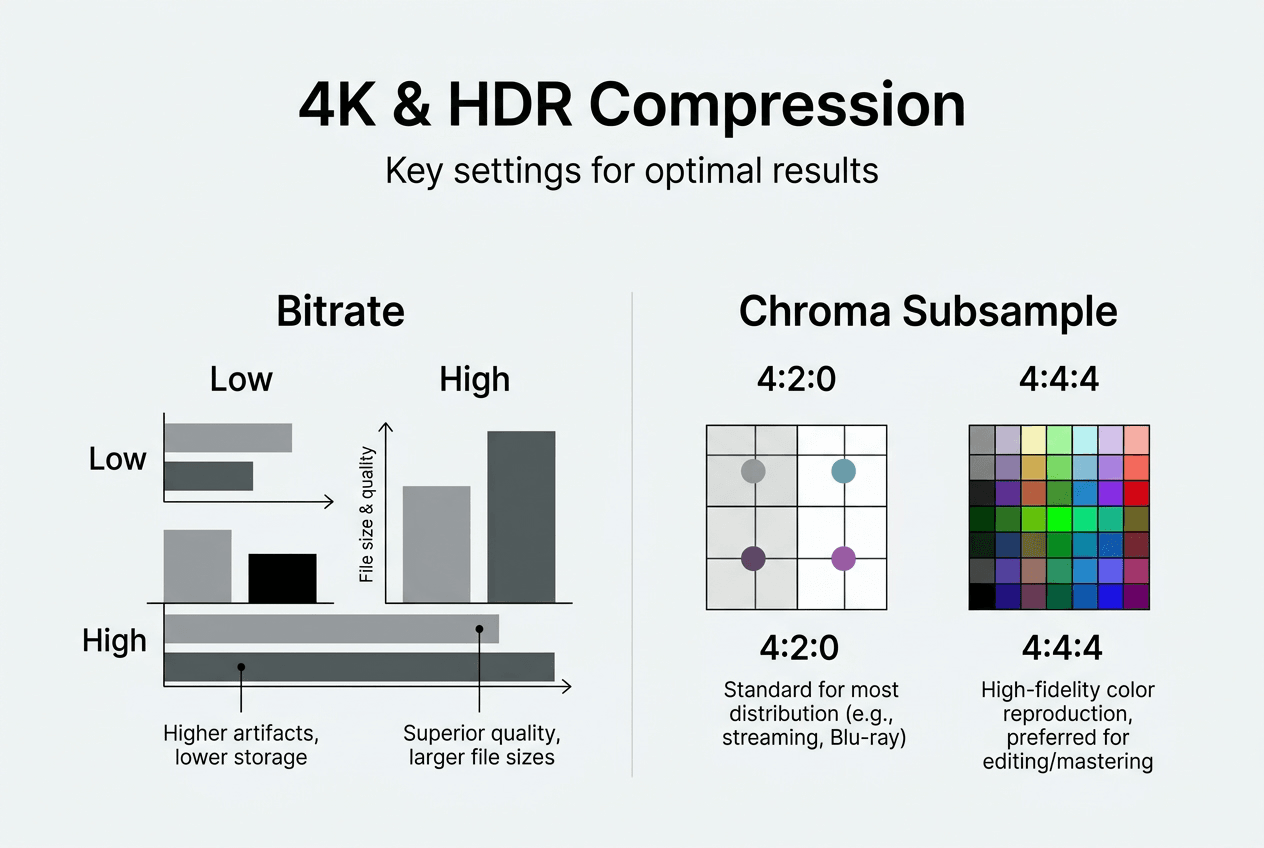
For 4K H.265 video, target these bitrate ranges:
| Content Type | Minimum Bitrate | Recommended Bitrate | Maximum Bitrate |
|---|---|---|---|
| Static scenes (talking head) | 8 Mbps | 12-15 Mbps | 20 Mbps |
| Moderate motion (documentary) | 15 Mbps | 20-25 Mbps | 35 Mbps |
| High motion (sports, action) | 25 Mbps | 35-45 Mbps | 60 Mbps |
Chroma subsampling reduces color information without visible quality loss. Your eyes perceive brightness detail better than color detail. The 4:2:0 format keeps full brightness (luma) but quarters color (chroma) resolution. This cuts file size by roughly one third with minimal perceptual impact for web delivery. Professional workflows sometimes use 4:2:2 to preserve more color data during editing.
Bit depth determines color precision. Encoding in 10-bit yields better results than 8-bit even for SDR delivery. Standard 8-bit provides 256 shades per color channel. 10-bit jumps to 1,024 shades, eliminating banding in gradients like skies or shadows. HDR content requires 10-bit minimum to represent its expanded range. The file size increase is modest (roughly 10-15%) for significant quality gains.
Two-pass encoding delivers optimal quality at any target file size. Here's how it works:
- First pass analyzes your entire video, measuring complexity scene by scene
- The encoder builds a map showing which sections need more bitrate
- Second pass encodes using this intelligence, allocating bits where they matter most
- Complex scenes get extra data, simple scenes use less, total size hits your target
Single-pass encoding guesses bitrate allocation on the fly, often wasting bits on easy sections while starving difficult ones. Two-pass takes longer but produces noticeably better results at identical file sizes. For archival or distribution masters, the extra time pays off.
Pro Tip: Match your bitrate to content complexity for best results. A 4K interview needs far less than 4K drone footage. Test a short segment first, review quality, then adjust before encoding your full project.
Streaming and delivery: How adaptive compression enhances viewer experience
Compressing for storage is one challenge. Delivering smooth playback across varying internet speeds and devices adds another layer of complexity. Adaptive streaming adjusts quality dynamically based on internet speed for smooth playback.
Adaptive streaming protocols like DASH and HLS split your video into small chunks (typically 2-10 seconds each). The server encodes multiple versions at different resolutions and bitrates. When viewers press play, their device requests chunks that match current bandwidth. Connection slows down? The player automatically switches to a lower quality version. Speed improves? It steps back up. This prevents buffering while maximizing quality.
YouTube's transcoding system demonstrates adaptive streaming at scale. Upload one high-quality file, and YouTube creates versions at 144p, 240p, 360p, 480p, 720p, 1080p, 1440p, and 4K. Each resolution exists in multiple bitrate variants. Popular videos get encoded in VP9 and AV1 alongside H.264. This redundancy ensures every viewer gets appropriate quality regardless of device or connection.
The compression choices you make for your master file cascade through this delivery chain. Start with a poorly compressed source, and every transcode inherits those artifacts. Begin with a high-quality master using appropriate settings, and the delivery versions maintain excellence at each resolution tier.
Benefits of adaptive streaming for creators include:
- Wider audience reach across connection speeds and device capabilities
- Reduced bandwidth costs by serving lower quality to viewers who don't need 4K
- Improved viewer retention through elimination of buffering pauses
- Automatic optimization without manual intervention per viewer
Adaptive streaming has reduced video abandonment rates by up to 60% compared to fixed-bitrate delivery, particularly for mobile viewers on cellular connections.
Understanding online video compressors features helps you prepare master files that transcode well. Prioritize clean compression at your highest target resolution. Avoid over-sharpening or heavy noise reduction, which can confuse encoders during transcoding. Let the delivery platform handle the complexity of creating multiple versions optimized for different scenarios.
Optimize your videos with HEVCut's advanced compression tools
Understanding compression theory matters, but applying it efficiently saves time and money. HEVCut simplifies the technical complexity into an accessible workflow designed for content creators managing 4K and HDR libraries.
The video compressor tool automatically applies optimal H.265 settings based on your source video characteristics. Upload your footage, and the system analyzes resolution, frame rate, and content complexity to select appropriate encoding parameters. You can reduce file sizes up to 70% while preserving the visual quality that defines your work.
Planning storage needs becomes straightforward with the video file size calculator. Input your shooting specifications and compression targets to estimate exactly how much space you'll need. This helps you budget for drives, cloud storage, or server infrastructure before costs spiral. Small businesses and independent creators particularly benefit from accurate forecasting that prevents surprise expenses.
HEVCut handles both automatic and manual workflows. Trust the intelligent defaults for quick processing, or dive into advanced settings when specific projects demand custom optimization. The platform eliminates the learning curve of professional encoding software while delivering comparable results for most use cases.
What is the difference between H.264, H.265, and AV1?
H.264 offers universal compatibility but requires larger files for 4K quality. H.265 doubles compression efficiency and handles HDR, making it ideal for modern workflows. AV1 provides the highest compression but encodes slowly and needs recent devices for hardware decoding. Choose H.264 for maximum compatibility, H.265 for balanced efficiency in 2026, or AV1 when storage savings justify longer encoding times.
How do I choose the right bitrate for my 4K videos?
Analyze your content complexity first. Static interviews need 12-15 Mbps with H.265, while action footage requires 35-45 Mbps. Use a bitrate calculator to estimate appropriate values based on resolution and motion. Test a short segment, review for artifacts, then adjust before encoding your complete project.
What is two-pass encoding and why does it matter?
Two-pass encoding analyzes video before final encode to allocate bitrate efficiently, improving detail and reducing artifacts. The first pass maps complexity throughout your video. The second pass uses this intelligence to distribute bits where they provide maximum quality benefit. The result is noticeably better quality at identical file sizes compared to single-pass encoding.
Is 10-bit encoding necessary for SDR videos?
10-bit encoding produces better results than 8-bit at the same file size, even for SDR videos. The extra color precision eliminates banding in gradients like skies and shadows. File size increases only 10-15%, making it worthwhile for any content where quality matters. HDR absolutely requires 10-bit, but SDR benefits significantly as well.