
High-resolution video files devour storage space at an alarming rate, driving up cloud costs and forcing creators into endless upgrade cycles. Many assume this trend is unavoidable as 4K and HDR content becomes standard. However, HEVC compression technology flips this assumption on its head, cutting file sizes by up to 70% without sacrificing visual quality. This guide reveals how content creators and small businesses can harness HEVC's advanced encoding capabilities to dramatically reduce storage demands, lower bandwidth costs, and streamline video workflows in 2026.
Table of Contents
- Understanding HEVC compression: what makes it efficient
- Practical benefits of HEVC for storage and bandwidth in 2025
- Challenges and considerations when adopting HEVC compression
- How to implement HEVC compression efficiently with available tools
- Optimize your video storage with HEVCut tools
Key takeaways
| Point | Details |
|---|---|
| HEVC reduces bandwidth by 50% | Compared to H.264, HEVC delivers identical visual quality while cutting streaming bandwidth and storage needs in half. |
| Flexible block partitioning drives efficiency | HEVC's Coding Tree Units adapt from 8x8 to 64x64 pixels, enabling superior compression over H.264's fixed 16x16 macroblocks. |
| Single encode profiles streamline workflows | Encoding once with optimized HEVC settings reduces processing time by 40% and eliminates redundant profiles. |
| Android 15 decoding issues require awareness | Some MediaTek devices experience HEVC playback failures after Android 15 updates, necessitating fallback strategies. |
| FFmpeg enables efficient batch encoding | Hardware acceleration with FFmpeg reduces CPU temperature by 11°C during large encoding jobs while maintaining quality. |
Understanding HEVC compression: what makes it efficient
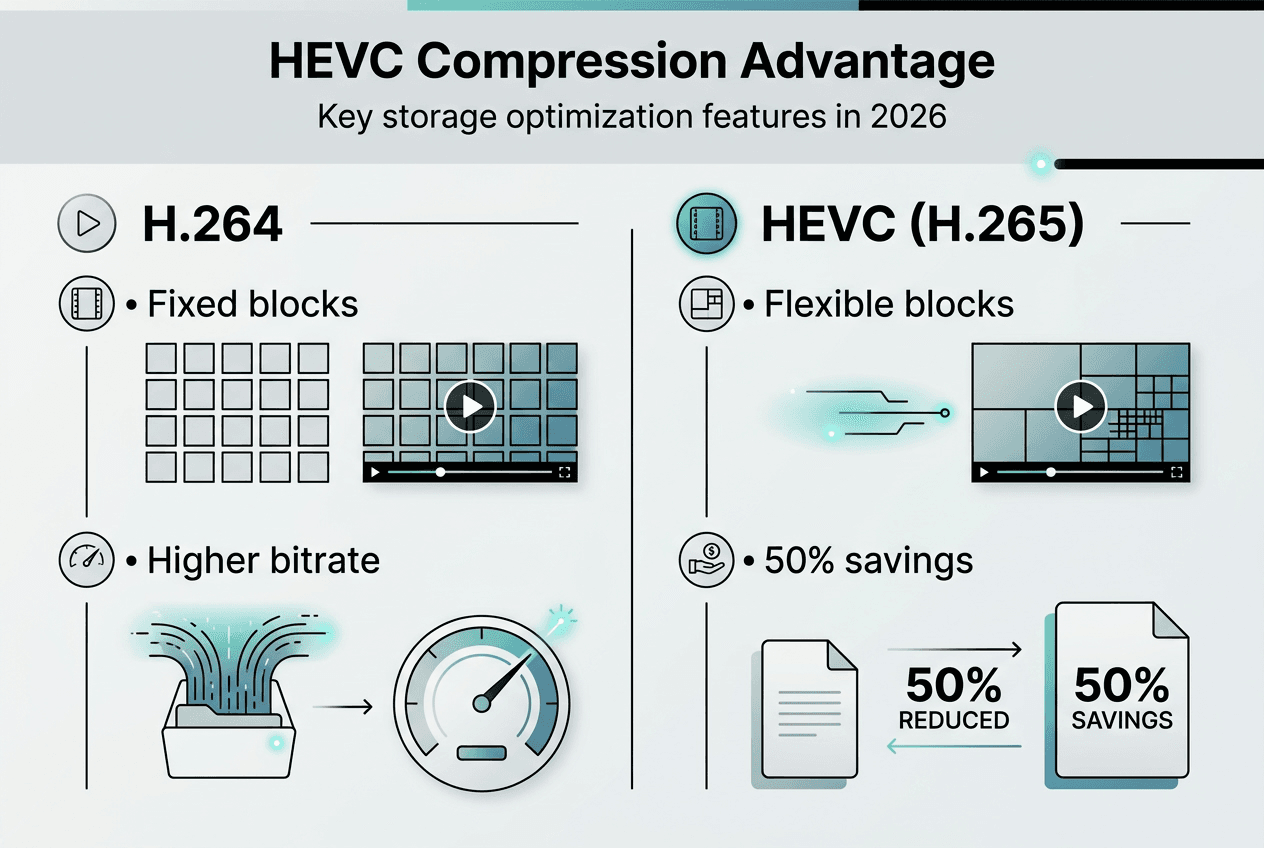
HEVC reduces streaming bandwidth by 50% compared to H.264 at identical visual quality, using Coding Tree Units that adapt block sizes dynamically. This fundamental architectural shift explains why HEVC achieves such dramatic storage savings. Understanding these technical foundations helps you make informed decisions about encoding presets and quality targets.
Coding Tree Units represent HEVC's breakthrough innovation. Unlike H.264's rigid 16×16 pixel macroblocks, HEVC replaces fixed architecture with flexible CTUs up to 64×64 pixels, improving compression by adapting to video content characteristics. When encoding a talking head video, large CTUs efficiently handle static backgrounds while smaller partitions capture facial details. This adaptive approach minimizes wasted bits on redundant information.
The flexible block partitioning system allows HEVC to subdivide CTUs into variable sizes from 8x8 to 64x64 pixels based on motion complexity and texture detail. A fast action scene with rapid camera movement benefits from smaller blocks that track motion precisely, while a corporate presentation with minimal movement uses larger blocks to reduce overhead. This intelligent adaptation delivers better prediction accuracy and tighter compression than H.264's one size fits all approach.
| Feature | H.264 | HEVC |
|---|---|---|
| Block size | Fixed 16x16 macroblocks | Flexible 8x8 to 64x64 CTUs |
| Prediction modes | 9 intra modes | 35 intra modes |
| Compression gain | Baseline | 40-50% better at same quality |
| Bitrate for 1080p | 8-12 Mbps | 4-6 Mbps |
HEVC introduces five key technical features driving its compression advantage over H.264: flexible block partitioning, advanced motion compensation, expanded intra prediction, improved entropy coding, and enhanced in loop filtering. Each feature contributes to tighter file sizes without visible quality loss. Motion compensation tracks objects across frames with quarter pixel precision, while expanded intra prediction uses 35 directional modes versus H.264's 9 modes to capture texture patterns more accurately.
Pro Tip: Understanding CTUs helps tailor encoding presets for your specific content needs. Use slower presets for content with complex motion or fine detail, and faster presets for simple talking head videos where large CTUs dominate.
This technical foundation connects directly to practical applications. When you grasp how CTUs adapt to content characteristics, you can select appropriate video compression best practices that balance encoding speed with compression efficiency. The storage saving guide for video creators builds on these principles to deliver actionable workflows.
Practical benefits of HEVC for storage and bandwidth in 2025
The technical advantages of HEVC translate into measurable savings that directly impact your bottom line. A 1080p stream encoded with H.265 requires roughly half the bitrate of H.264 for identical visual quality; 4K bandwidth drops from 25-35 Mbps to 12-16 Mbps. These reductions compound across your entire video library, freeing up terabytes of storage space and slashing monthly cloud costs.

| Resolution | H.264 Bitrate | H.265 Bitrate | Savings |
|---|---|---|---|
| 1080p | 8-12 Mbps | 4-6 Mbps | 50% |
| 4K | 25-35 Mbps | 12-16 Mbps | 52% |
| 720p | 5-8 Mbps | 2.5-4 Mbps | 50% |
Beyond raw bitrate reduction, HEVC streamlines your entire production workflow. Encoding once with H.265 at CRF 23-25 and capped resolutions significantly reduces encoding time by 40%, storage by 57%, and maintains identical perceptual quality across major mobile devices. This single encode approach eliminates the need to maintain separate profiles for different platforms, cutting complexity and reducing points of failure.
The workflow efficiency gains extend beyond time savings. Maintaining multiple encoding profiles increases workflow latency by over 22 seconds per video and raises error rates and bandwidth consumption unnecessarily. Every additional profile introduces opportunities for misconfiguration, quality inconsistencies, and storage overhead. Consolidating to a single optimized HEVC profile simplifies quality control and accelerates delivery timelines.
Practical advantages of HEVC adoption include:
- Storage footprint reduction of 50-70% compared to H.264 at equivalent quality levels
- Encoding time savings of 40% when using single profile workflows versus multi profile approaches
- Bandwidth cost reduction enabling cheaper content delivery and faster user experiences
- Error minimization by avoiding redundant encodes and profile management complexity
- Future proofing as 8K content adoption accelerates and storage demands multiply
Pro Tip: Use single encode profiles with recommended settings like CRF 23-25, capped resolution at 1080p, and AAC audio to streamline workflows and minimize errors. This approach delivers the best balance between quality, file size, and compatibility across modern devices.
These benefits enable content creators to reduce storage costs dramatically while improving delivery efficiency in 2026. A creator producing 100 hours of 4K content annually saves approximately 12 TB of storage by switching from H.264 to HEVC, translating to hundreds of dollars in cloud storage fees. The storage saving guide video creators 2026 provides detailed calculations for your specific use case, while the content creators ultimate storage guide offers comprehensive strategies for maximizing these savings.
Challenges and considerations when adopting HEVC compression
While HEVC delivers impressive compression gains, compatibility challenges require careful planning before full adoption. The most significant recent issue affects Android devices running version 15. H.265/HEVC decoding fails on MediaTek Dimensity 700, 900, and 1080 devices after Android 15 upgrade, causing playback failures with no logged errors. Users encounter black screens or frozen frames when attempting to play HEVC encoded videos, creating frustrating experiences that damage creator credibility.
The scope of this issue is substantial given MediaTek's market share in mid range Android devices. Affected devices include popular models from Xiaomi, Realme, and OnePlus that collectively represent millions of potential viewers. The problem appears isolated to hardware decoding, as H.264 playback works fine on same devices and conditions; the issue is specific to H.265 hardware decoding post Android 15 upgrade. Software decoding remains functional but consumes significantly more battery power and generates excessive heat.
Affected devices and symptoms include:
- MediaTek Dimensity 700, 900, and 1080 chipsets across multiple device manufacturers
- Black screen or frozen first frame when attempting HEVC video playback
- No error messages logged in Android system logs, complicating troubleshooting
- Successful playback of identical videos encoded in H.264 format
- Issue persists across multiple video player applications and browsers
Mitigation strategies to maintain audience reach:
- Encode fallback versions in H.264 for affected users and implement adaptive streaming that detects device capabilities
- Test playback thoroughly on target devices before distributing HEVC content to production audiences
- Monitor OS updates from Google and MediaTek as fixes may be released in future Android patches
- Communicate transparently with users experiencing issues and provide alternative viewing options
- Consider hybrid approaches that use HEVC for desktop and iOS while maintaining H.264 for Android users
Compatibility awareness is critical for creators relying on HEVC in 2026. While the codec offers unmatched compression efficiency, playback failures on popular devices can undermine audience satisfaction and engagement metrics. Balancing compression advantages with universal accessibility requires strategic planning and fallback mechanisms.
The decision to adopt HEVC should weigh compression benefits against potential playback disruptions. For content targeting primarily iOS users or desktop viewers, HEVC adoption proceeds with minimal risk. However, creators serving diverse Android audiences must implement robust testing protocols and maintain H.264 alternatives. The choose between HEVC and H.264 guide provides decision frameworks tailored to your audience demographics and distribution channels.
How to implement HEVC compression efficiently with available tools
FFmpeg provides the most flexible and powerful solution for implementing HEVC compression at scale. This command line tool supports all major hardware acceleration platforms and offers granular control over encoding parameters. Understanding key settings enables you to optimize the quality, speed, and file size tradeoff for your specific content requirements.
Key FFmpeg command parameters for efficient H.265 encoding:
- Use CRF values between 23 and 25 to maintain perceptual quality while achieving substantial file size reduction
- Cap resolution at 1080p maximum to optimize file sizes without sacrificing viewer experience on most devices
- Set max bitrate to 8 Mbps for landscape orientation and 4 Mbps for portrait to prevent quality spikes
- Encode audio as AAC-LC at 128 kbps stereo for broad compatibility and transparent quality
- Apply the medium or slow preset to balance encoding speed with compression efficiency
FFmpeg Essentials + Advanced Tuning course teaches quality focused command strings and automation to encode H.264, HEVC, and AV1 efficiently. The course covers advanced topics like psychovisual tuning, adaptive quantization, and scene detection that squeeze additional compression gains from HEVC without visible quality loss. These techniques prove especially valuable when encoding large video libraries where small percentage improvements compound into massive storage savings.
Hardware acceleration dramatically reduces encoding time and system resource consumption. Using FFmpeg's native hardware accelerated encoding like QSV, VideoToolbox, or VA-API reduces CPU temperature by 11°C during batch jobs. This thermal reduction extends hardware lifespan and enables parallel encoding of multiple videos simultaneously.
Hardware acceleration options supported by FFmpeg:
- Intel Quick Sync Video (QSV) for Intel processors with integrated graphics on Windows and Linux
- Apple VideoToolbox for M series and Intel Macs providing native HEVC encoding acceleration
- NVIDIA NVENC for GeForce and Quadro GPUs delivering fastest encoding speeds with quality tradeoffs
- AMD VCE for Radeon graphics cards offering competitive performance on Windows and Linux
- VA-API for Linux systems with Intel or AMD graphics enabling open source hardware encoding
Pro Tip: Automate large encoding projects using bash scripting with variables and loops to handle large video batches efficiently. Create a simple script that iterates through a directory, applies consistent encoding parameters, and logs results for quality control review.
Balancing encoding speed, quality, and storage tradeoffs requires testing with your specific content types. Talking head videos tolerate faster presets and higher CRF values without visible quality loss, while action footage with rapid motion benefits from slower presets and lower CRF values. Invest time upfront to establish baseline quality standards, then optimize encoding parameters to meet those standards with minimal processing time. The video compression best practices guide provides testing frameworks and quality assessment techniques, while the video bitrate calculator helps estimate file sizes before encoding.
Optimize your video storage with HEVCut tools
Now that you understand HEVC's technical advantages and implementation strategies, putting this knowledge into practice becomes straightforward with specialized tools. HEVCut offers purpose built calculators and compressors designed specifically for content creators seeking to optimize video storage without sacrificing quality.
The storage savings calculator provides precise estimates of how much space you'll reclaim by switching from H.264 to HEVC compression. Input your current library size and video specifications to see projected savings in gigabytes and dollars. This planning tool helps justify the time investment in re encoding existing content by quantifying the long term storage cost reductions.
For immediate file size reduction, the video compressor tool available for Apple devices quickly compresses videos without quality loss. The intuitive interface requires no technical knowledge, automatically applying optimized HEVC encoding settings that balance compression efficiency with visual fidelity. The video size calculator helps estimate final file sizes before processing, enabling better storage planning and content delivery strategies.
FAQ
What devices support HEVC hardware decoding in 2026?
Mobile devices manufactured since Q3 2020 universally support H.265/HEVC Main Profile Level 4.1 decoding in hardware. This includes all recent iPhones, iPads, and most Android devices from major manufacturers. However, some Android 15 devices with MediaTek chipsets experience decoding failures requiring fallback strategies.
How can I avoid playback issues on affected Android devices?
Fallback to H.264 encoding and thorough device testing can mitigate playback failures on affected devices. Implement adaptive streaming that detects device capabilities and serves appropriate formats automatically. Monitor Android OS updates as Google and MediaTek work to resolve the hardware decoding bug. The HEVC vs H.264 guidance provides detailed decision frameworks.
What encoding settings balance quality and storage best?
Encoding with CRF 23-25, resolution cap at 1080p, max bitrate 8 Mbps landscape or 4 Mbps portrait, and AAC-LC 128 kbps stereo audio hits ideal balance. These settings deliver transparent quality across modern devices while achieving 50-70% file size reduction compared to H.264. The video compression best practices guide offers detailed parameter explanations.
Are there alternatives to HEVC for video compression?
Royalty free codecs like AV1 are emerging as alternatives due to HEVC's patent licensing challenges. AV1 offers competitive compression efficiency without licensing fees, though encoding times remain significantly longer and device support lags behind HEVC. Codec choice depends on content strategy, target audience devices, and licensing considerations. The choosing video codecs resource compares options comprehensively.